What Is Multi-Agent Orchestration? (Plain-English Definition)
Multi-agent orchestration is a coordination layer that routes tasks between specialised AI agents, manages shared context across a workflow, and determines when to escalate a case to a human operator.
Think of it like a management layer for AI workers. A single AI agent is capable — it can research, draft, update systems, and send messages. But give it a 200-applicant hiring pipeline, a 12-department product launch, or a multi-territory sales campaign, and it will run into structural limits no single agent can solve: context window ceilings, specialisation trade-offs, sequential bottlenecks, and escalation blind spots.
Orchestration solves all four of those problems. It is what allows a team of specialised AI workers to operate as a coordinated system — the same way a human organisation does — rather than as isolated tools.
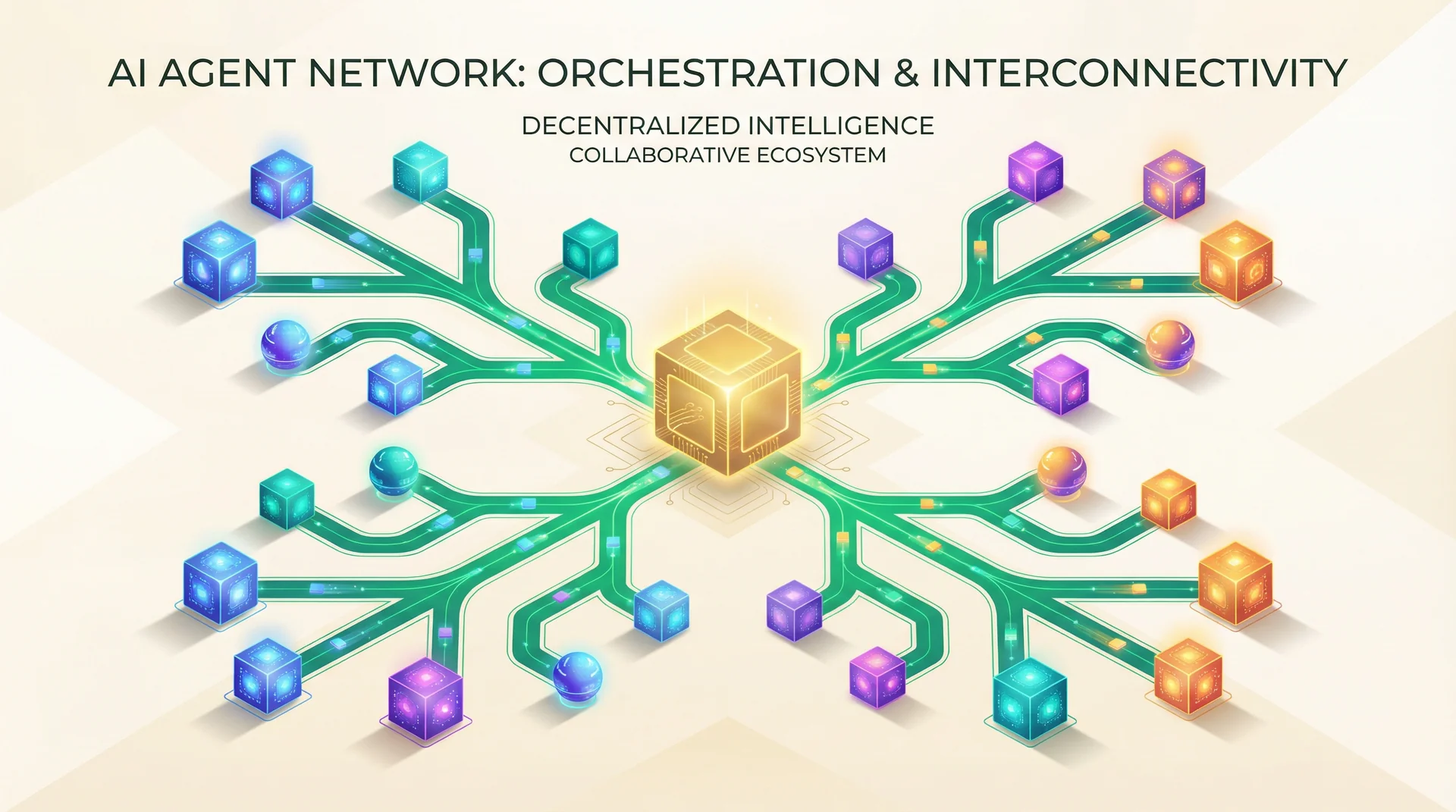
Quick definition: Multi-agent orchestration = specialist agents + routing logic + shared context + human escalation paths. It is not the same as chaining, workflow automation, or bot management — though people often use those terms interchangeably.
The Four Problems Single Agents Cannot Solve
Before building orchestration, it helps to understand exactly why single agents hit their ceiling. There are four structural reasons — and each one directly motivates a specific orchestration capability.
- Context window limits: Even the most capable large language models have a maximum amount of information they can process in one session. A complex workflow — say, a full hiring pipeline across 200 candidates — generates far more context than any single agent can reliably hold. Orchestration distributes context across agents, each of which manages a focused slice.
- Specialisation trade-offs: An agent optimised for research is not optimised for scheduling or for voice-based screening. Generalist agents make generalist-quality decisions. When you need expert-level output from each step in a workflow, you need specialist agents coordinated well — not one agent stretched across incompatible skill sets.
- Sequential bottlenecks: A single agent works through tasks one at a time. When multiple tasks can run in parallel — three teams of researchers working different data sources simultaneously, for example — a single-agent system introduces latency that orchestration eliminates entirely. What takes hours sequentially takes minutes in parallel.
- Human handoff precision: Not every edge case should escalate to a human. But some must. A single agent applying a universal escalation rule — either everything, or nothing — creates either bottlenecks or errors. Orchestration allows precise control: this specific condition, at this specific step, goes to this specific human with this specific context pre-assembled.
The Three Orchestration Patterns
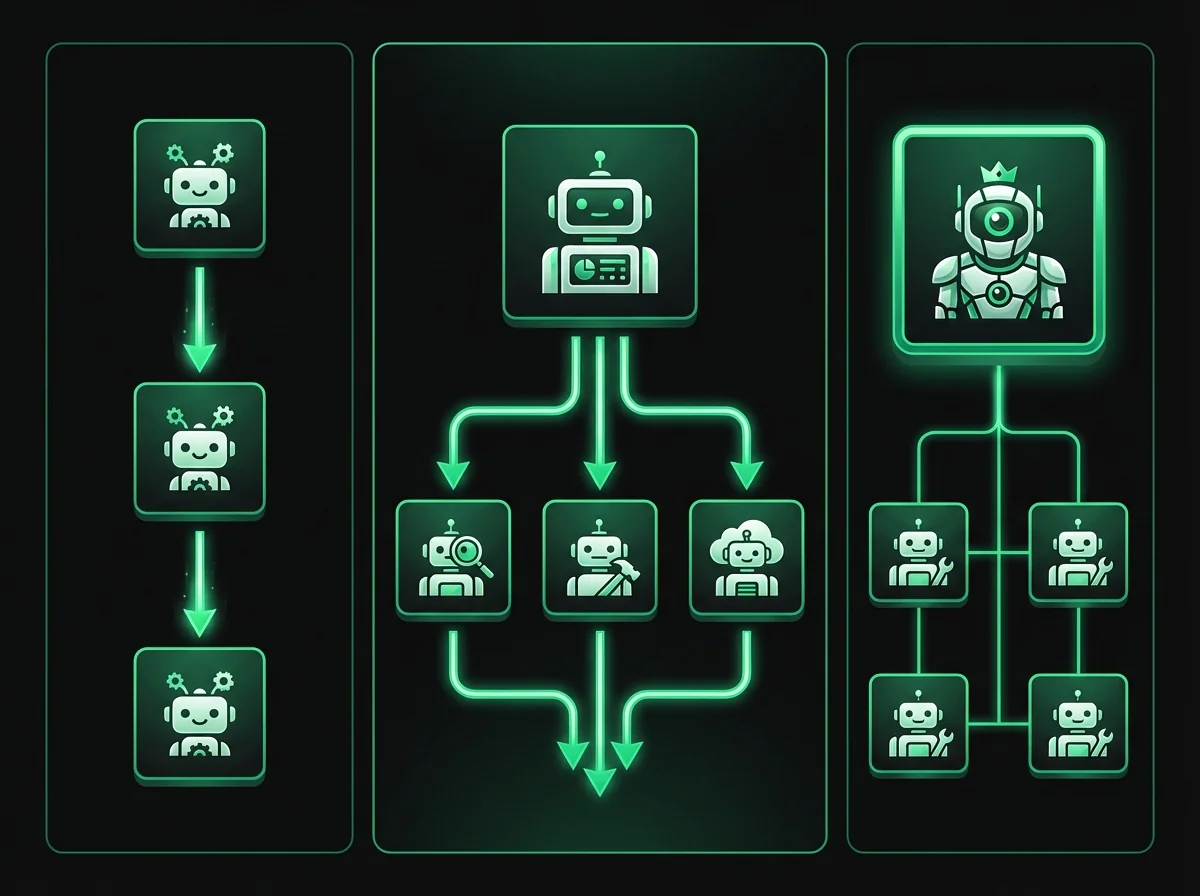
Most multi-agent systems in production use one of three structural patterns, or a deliberate combination of them. Understanding which pattern fits a workflow determines whether the system will scale or stall.
Pattern 1: Sequential Pipeline
Agent A completes its task and passes output to Agent B. Agent B completes its task and passes to Agent C. At a defined decision point, the workflow escalates to a human with all prior context pre-assembled.
Each agent receives the structured output of the previous agent as part of its context. Information flows forward through the pipeline — not backward, not sideways.
When to use it: Linear workflows with clear dependencies, where each step must complete before the next begins. Hiring pipelines, client onboarding sequences, and multi-step content production are the canonical examples. Any workflow where "step 2 cannot start until step 1 is complete" maps naturally to sequential orchestration.
Risk to watch for: If Agent B gets stuck, the entire pipeline pauses. Sequential systems need retry logic and fallback paths at every transition point, or a single failure cascades forward.
Pattern 2: Parallel Fan-out
An orchestrator agent distributes the same task to multiple specialist agents simultaneously. Each agent works independently on its slice. A synthesis agent then receives all results and produces a unified output.
Total elapsed time equals the slowest individual agent — not the sum of all agents. For research-intensive workflows, this distinction is the difference between a 3-hour process and a 20-minute one.
When to use it: Research aggregation, competitive monitoring, multi-source data synthesis, and any workflow where coverage and speed both matter. Three AI Research Analysts searching news, financial filings, and social sentiment simultaneously — then combining results — is the archetypal fan-out deployment.
Risk to watch for: Result aggregation logic must handle contradictions between agent outputs. If Agent A and Agent C reach different conclusions from different data sources, the synthesis agent needs explicit instructions for how to resolve the conflict — or it will guess.
Pattern 3: Hierarchical Supervisor
A manager agent oversees a team of specialist agents, monitors their outputs for quality and completeness, intervenes when an agent is stuck, and escalates to a human operator only when the team as a whole cannot resolve a case.
This pattern mirrors the structure of a real management chain. The manager does not do the specialist work — it routes, monitors, and decides when to escalate.
When to use it: Large-scale operations where individual agents frequently encounter edge cases, where output quality needs a review layer, and where the complexity of the workflow exceeds what any single escalation trigger can handle. An AI Operations Manager coordinating support, scheduling, and data entry agents is the production example. When the Support Agent hits a policy question it cannot answer, the Operations Manager reroutes — rather than sending an error to the end user.
Risk to watch for: The manager agent becomes a single point of failure. If its routing logic is poorly configured, it will route poorly at scale. Test the manager in isolation before connecting the team.
How Context Is Shared Between Agents
Context management is the orchestration problem most frameworks underestimate. Getting agents to communicate is the easy part. Getting them to share the right information, in the right format, without contradiction, duplication, or stale data — that is where most custom orchestration implementations fail.
There are two models for context sharing in multi-agent systems:
| Method | How It Works | Best For | Main Risk |
|---|---|---|---|
| Passed State | Each agent receives only the structured output of the previous agent | Sequential pipelines, auditable workflows, regulated industries | Agent B cannot access context from two steps back without an explicit handoff schema |
| Shared Memory | All agents read/write to a shared context object — a persistent record of the entire workflow state | Complex hierarchical workflows, research aggregation | Agents can overwrite each other's contributions or draw on stale data without strict access controls |
The AgentsHub visual canvas uses a hybrid model: shared knowledge bases give every agent access to your organisation's documents and context, while structured handoff schemas define exactly what information passes forward at each step. Agents are explicitly scoped — they cannot modify context outside their designated area — which prevents the most common failure mode in custom-built orchestration.
A Real Orchestration Example: The Hiring Pipeline
Abstract explanations only take you so far. Here is a concrete walkthrough of multi-agent orchestration in production — the hiring pipeline that AgentsHub documents as a canonical example of what coordinated AI workers can accomplish.
A company posts a senior engineering role. Over 48 hours, 200 applications arrive. Here is how the orchestration workflow runs:
- AI Sourcing Agent (Research pattern) — Reviews all 200 applications against the role criteria. Scores each on technical fit, experience depth, and signal quality. Outputs a ranked shortlist of 40 candidates with structured notes per applicant. Tools used: ATS integration, job description comparison, LinkedIn profile lookup. Elapsed time: approximately 12 minutes.
- AI HR Screener (Sequential handoff from step 1) — Receives the top 40 candidates. Calls each one using the integrated voice engine. Conducts a structured 15-minute screening interview. Transcribes responses, scores against the rubric, and writes results back to the ATS. Flags the top 15 for panel review. Tools used: voice telephony, ATS write-back, calendar integration.
- AI Scheduler (Sequential handoff from step 2) — Receives the top 15 candidates. Sends panel interview invitations, checks panel member availability across timezones, and books slots directly into calendars. Confirmation emails sent automatically. Tools used: calendar integration, email, ATS status update.
- Human Hiring Manager (Escalation point) — Joins the workflow at the final conversation stage. Receives a structured briefing note — produced by the Sourcing Agent — before each interview. The human's time is spent entirely on the judgment work that requires it: reading candidates as people, assessing culture fit, negotiating offer terms.
Total elapsed time from application close to scheduled panel interviews: approximately 18 hours, mostly overnight. The same process managed manually typically takes two to three weeks.
This is not a futures projection. This workflow is deployable today on AgentsHub using roles from the 35-role AI worker library connected on the visual canvas.
Building vs. Buying Orchestration
If your organisation has a strong engineering team with LLM experience and highly specific orchestration requirements, building on frameworks like CrewAI, LangGraph, or AutoGen is a legitimate path. These frameworks give you complete control over routing logic, memory architecture, and agent behaviour at every step.
Here is an honest side-by-side of what each path actually requires:
| Requirement | Build (Custom Framework) | Buy (AgentsHub) |
|---|---|---|
| Technical expertise needed | Python developers with LLM experience | Non-technical operators can configure |
| Routing logic | Custom code for every decision point | Visual canvas with condition UI |
| Memory management | Build from scratch | Built-in shared knowledge base |
| Observability | Requires custom logging layer | Native audit log per agent step |
| Integrations | Custom API work per tool | 500+ pre-built via Salesforce, Slack, HubSpot, and more |
| Time to production | 4–12 weeks for a stable system | Hours to days |
| Voice capability | Requires third-party integration | Native voice with 10+ languages |
| Ongoing maintenance | Dedicated engineering resources | Platform managed |
Both paths are valid. The question is whether your engineering team's cycles are best spent building orchestration infrastructure — or building the product your customers pay for. If orchestration is not your core product, it is probably not the best use of that engineering time.
Four Principles of Production-Ready Orchestration
Four principles separate orchestration systems that work in production from those that look impressive in demos but fail under real-world conditions:
- Single responsibility per agent. Each agent has one clearly defined job. If an agent is simultaneously responsible for research, outreach, and scheduling, it will do all three at a generalist level. Define scope narrowly. Add agents rather than expanding existing ones. The hiring pipeline example above works precisely because each agent does exactly one thing well.
- Context flows forward, not backward. Information passes downstream through the pipeline. Circular dependencies — where Agent B needs output from Agent C, which needs output from Agent B — create deadlocks. Design workflows as directed acyclic graphs: every dependency flows in one direction. If you find yourself needing circular context flow, that is a signal to restructure the workflow.
- Every workflow has a defined human escalation point. Not as an afterthought, and not as a catch-all. Define precisely which conditions trigger human review, at which step, and what information the human receives when they enter the workflow. Escalation without context is a different kind of bottleneck — the human has to reconstruct the situation from scratch, eliminating most of the time value the AI system created.
- The orchestrator is fully observable. You must be able to see what every agent decided, at every step, in human-readable form. This is not optional for production systems. When something goes wrong — and in any sufficiently complex system, something will eventually go wrong — observability is the difference between a 10-minute fix and a three-day investigation with no clear root cause.
How to Start With Multi-Agent Orchestration
The most common mistake organisations make when starting with orchestration is beginning with a ten-agent system. The complexity of debugging, refining, and observing a ten-agent workflow is disproportionate to the additional value it delivers over a well-configured two-agent workflow. Start simple. Expand from evidence.
- Start with two agents in a sequential pattern. The AI Receptionist passing qualified leads to an AI Customer Support Agent is the most common entry point. It is simple enough to configure in an afternoon, and it surfaces real data about routing logic, handoff quality, and escalation triggers — data that will directly inform every subsequent agent you add to the system.
- Measure for 30 days before expanding. Track: how many handoffs triggered, what percentage were handled correctly end-to-end, and which edge cases generated escalations. Every escalation is a data point — it tells you exactly where the orchestration logic needs refinement.
- Add the third agent based on data, not ambition. What is the highest-friction step that the two-agent system is not covering? That is where the third agent goes. The AI Research Analyst is the most common third addition — preparing context for the human escalation step so that when the human enters the workflow, they have everything they need to act immediately.
- Introduce fan-out patterns when volume demands it. Once sequential pipelines are stable, fan-out patterns become relevant for the research and monitoring use cases where coverage and speed both matter. Build the spine of the workflow first. Add parallelism where the bottleneck genuinely is throughput.
For teams evaluating AgentsHub specifically, the visual canvas maps directly to all three orchestration patterns described above. Workflows are configured by connecting agent nodes — not by writing routing logic in code. The platform handles the context management, handoff schemas, and observability layer. You define the job roles, the tools, the routing conditions, and the escalation triggers.
See the AgentsHub pricing page for deployment options — multi-agent orchestration is available on all plans, with advanced canvas features on the growth and enterprise tiers.
Frequently Asked Questions About Multi-Agent Orchestration
What is the difference between multi-agent orchestration and workflow automation?
Workflow automation executes predefined scripts: when condition X occurs, perform action Y. The path is fixed. Multi-agent orchestration makes decisions about which path to take. An orchestrated system can handle inputs it has never seen before, route edge cases to the appropriate agent or human, and adapt to context that changes mid-workflow. Automation follows rules. Orchestration applies judgment within rules.
Do I need a developer to build a multi-agent orchestration system?
It depends on how you deploy. Custom frameworks like CrewAI, LangGraph, and AutoGen require Python developers with LLM experience. The AgentsHub visual canvas is designed for non-technical operators — routing conditions, handoff schemas, and escalation triggers are configured through a UI, not code. Both approaches are valid depending on your requirements and engineering capacity.
How many agents should be in an orchestration system?
Start with two agents in a sequential pattern. Industry experience with production multi-agent systems suggests that two well-configured agents produce more reliable output than ten poorly scoped ones. Add agents incrementally, based on measured evidence of where the existing system creates bottlenecks or misses cases — not based on what looks comprehensive on a diagram.
What happens when a multi-agent system makes a mistake?
Well-designed orchestration systems have two lines of defence: escalation triggers that catch cases the agents cannot handle, and an observability layer that records every agent decision so mistakes can be traced and corrected. An agent making a consistent mistake means the system prompt, routing condition, or knowledge base needs refinement — which is a configuration change, not a rebuild. Design escalation paths before go-live, not after the first production failure.
How does multi-agent orchestration handle real-time data and integrations?
Each agent in an orchestrated workflow maintains its own tool connections — the same integrations a human employee would use for that role. An AI Scheduling Agent connects directly to calendar systems. An AI Support Agent connects to the CRM and ticketing platform. Context shared between agents includes both the structured outputs of prior steps and live data pulled from connected systems at the time of task execution. AgentsHub connects to Salesforce, HubSpot, Notion, and 30+ other platforms with no custom API work required.
Is multi-agent orchestration the same as agentic AI?
They overlap but are not identical. Agentic AI refers to AI systems that can take actions autonomously — plan, use tools, and pursue goals without step-by-step human instruction. Multi-agent orchestration is a structural pattern for coordinating multiple agentic systems. A single agent can be agentic without being part of an orchestrated system. Multi-agent orchestration is what you build when you need multiple agentic systems working together reliably.
For the broader context on AI workforce deployment — including how orchestration fits into a complete AI workforce strategy — see: What Is an AI Workforce? A Plain-English Guide.
Ready to deploy your first multi-agent workflow? Explore the 35 available AI worker roles and build your first orchestration on the AgentsHub visual canvas.